GradeLine for Mac

See the work.
See the whole picture.

Every paper. Every student.
One thoughtful grading workspace.

Actual GradeLine app. Sample classroom and fictional student work.
Native to Mac.Ready to work offline.Always your call.

A place for the whole day

From first look.
To full picture.

GradeLine is a native Mac grading app for teachers. Bring student work, custom rubrics, your gradebook, and class insights into one connected workspace.

A clear place to begin.

Waiting submissions, approaching deadlines, and work that needs attention. Open the day with the context already in front of you.

Annotation Studio

Big ideas deserve
a closer look.

The original page. Your tools. Your criteria.
A focused space to give thoughtful feedback.

01

Make your mark.

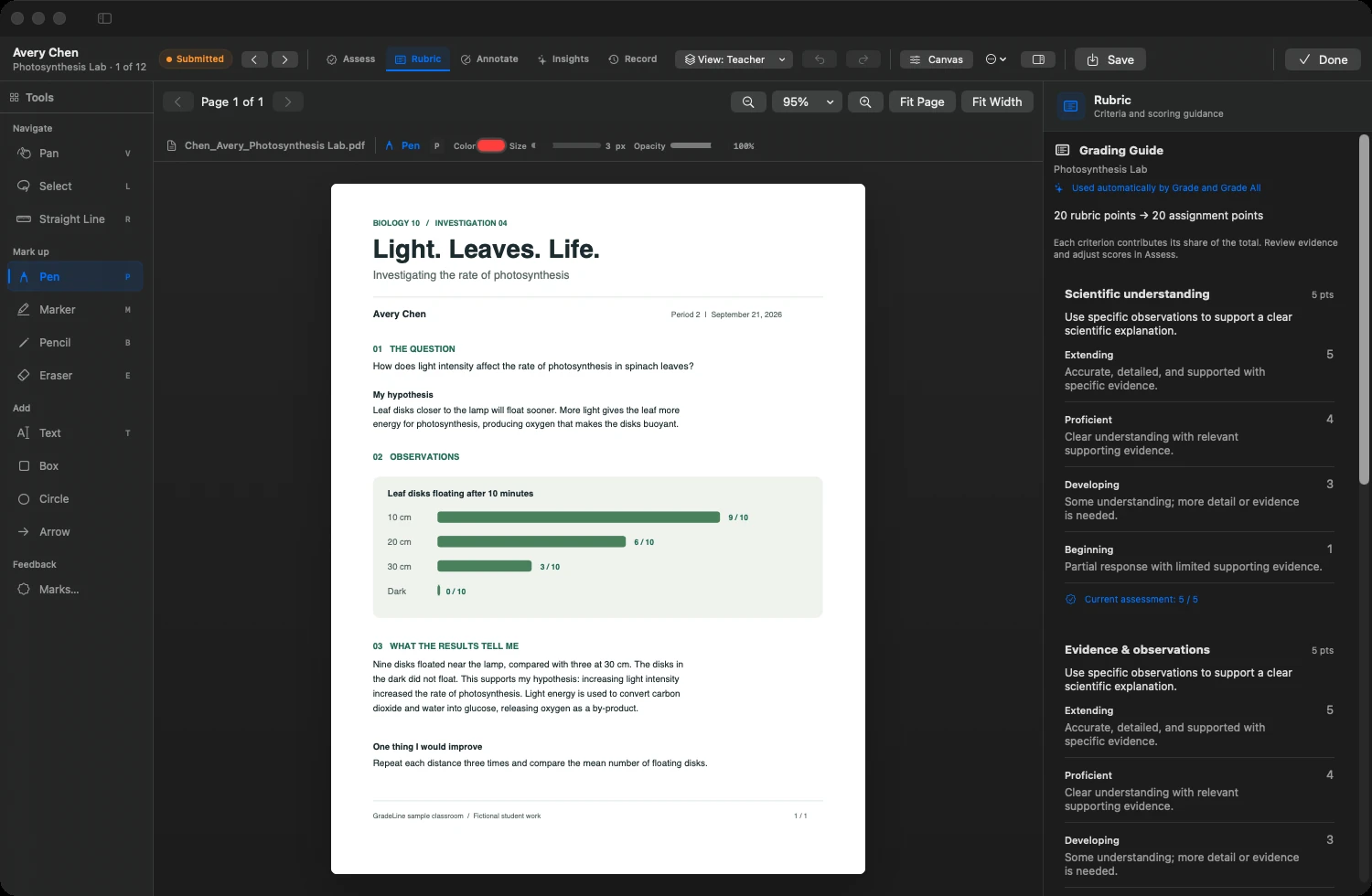
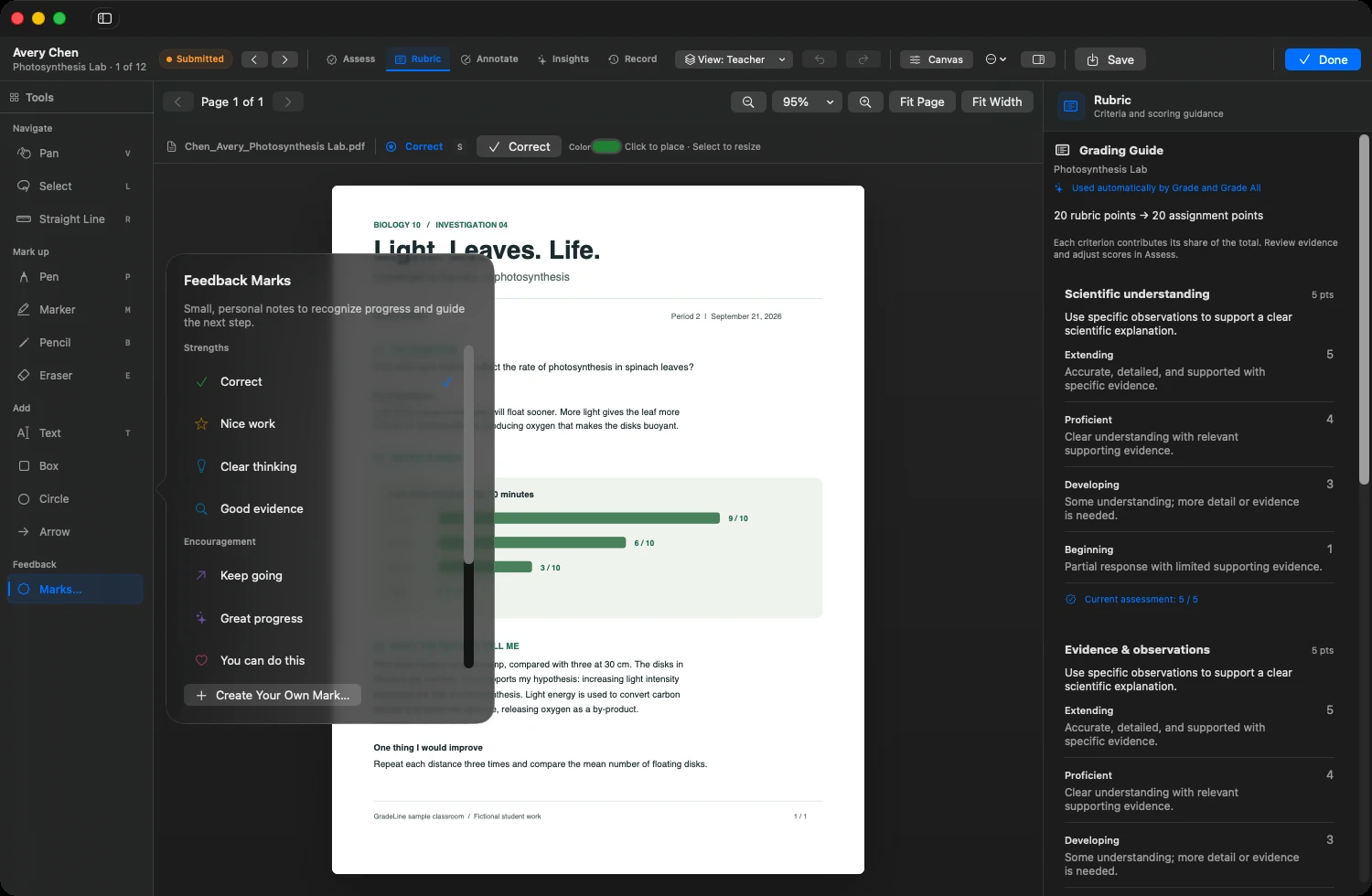
Write, highlight, sketch, add text, or point to the detail that matters. Pen, pencil, marker, shapes, and feedback marks are right beside the page.

02

Keep the criteria close.

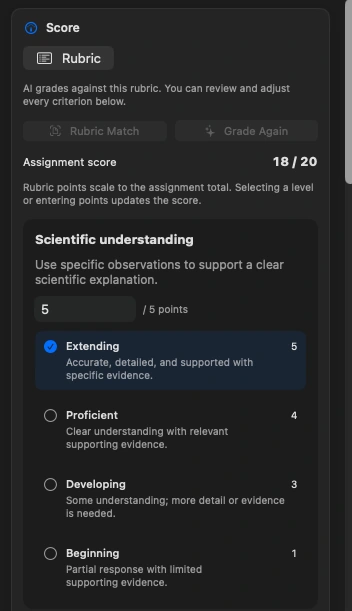
Build your rubric with performance levels and point values. Select a level as you review; GradeLine scales the rubric to the assignment total.

03

Stay in your flow.

Zoom to the page or its width. Move between submissions. Undo an edit. Switch tools with a key. Save the workspace setup that suits your way of grading.

Actual Studio rubric panel showing an 18/20 assignment score and selectable performance levels for Scientific understanding.
Your rubric.
Your judgment.
Teacher annotations and AI notes have separate views. You can review and adjust the result.

Bring your work with you

The stack.
Meet the Mac.

Paper, photos, documents.
Ready for a closer look.

Import PDFs, images, Word files, text, or a whole folder. Match work by filename, choose a student yourself, or leave unmatched files in Review.

Combine pages into one submission or split a scanned stack into fixed-size student packets. GradeLine keeps the originals.

PDFPhotosWordText

Scan with a compatible iPhone through macOS, or bring in files from your scanner.

Thought through, all the way

The little things.
That add up.

Teaching doesn’t begin and end with a score. Neither does GradeLine.

01Bring the roster. Keep the context.

Import classes, students, and existing grades from CSV, TSV, Excel .xlsx, or pasted spreadsheet cells. Review the column mapping and proposed changes before saving.

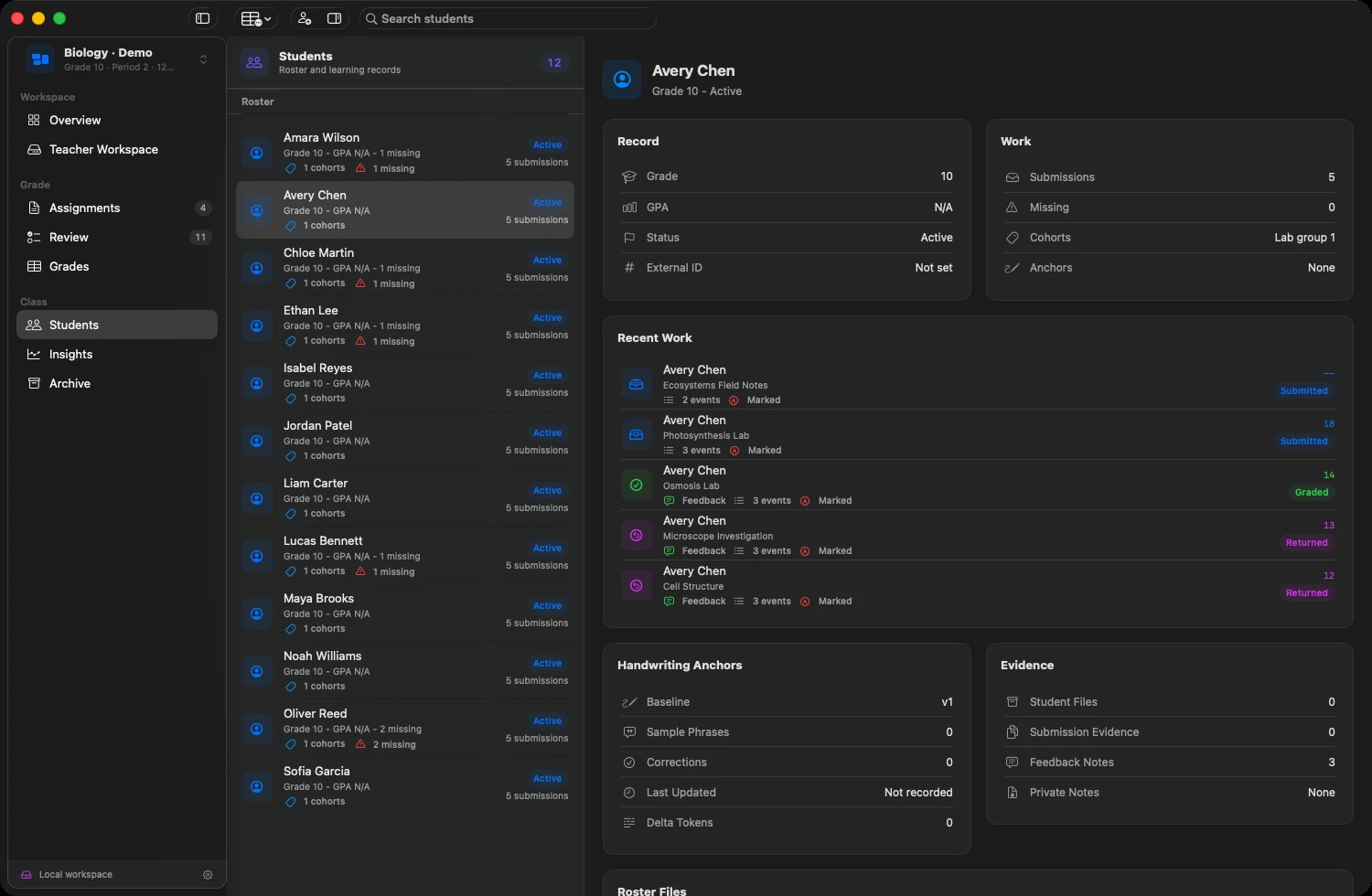
Student records bring assignment history, cohort tags, notes, and missing work together.

See the student workspace
02A rubric that’s really yours.

Start from a rubric structure, tailor each criterion, and define performance levels and points. Use an answer key when the assignment calls for accepted answers. Local text recognition can help bring criteria in from a document.

See the rubric reference
03Feedback with a personal touch.

Use quick feedback phrases and marks for strengths, encouragement, and next steps. Create your own feedback marks, including custom SVG artwork, and keep them on your Mac.

Explore feedback marks
04Finished doesn’t mean forgotten.

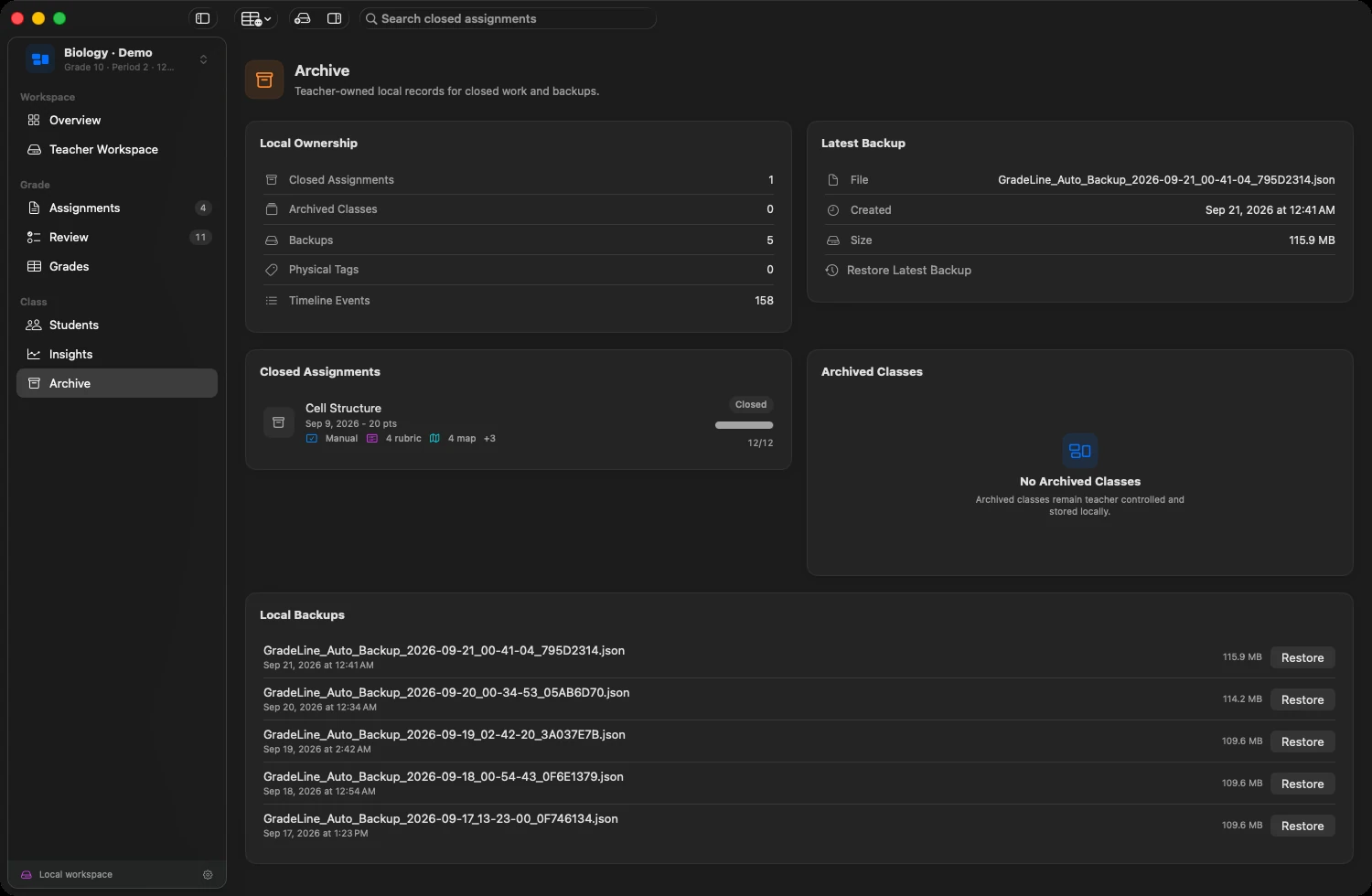
Export annotated work as PDF, or export the first page as an image. Batch export an assignment, keep local backups, and return to closed assignments in Archive when you need the work again.

See the archive

Local by design

Your classroom.
On your Mac.

Classes, documents, rubrics, annotations, and backups.
A local workspace you can use without a GradeLine account.

The everyday essentials

Offline feels
right at home.

Organize classes, read and annotate work, score with rubrics, and review grades without a connection. Built-in Apple Vision recognizes text locally.

Export when you’re ready. Keep local backups for the work you want to preserve.

When you choose to connect

Optional AI.
Explicit control.

Connect a supported AI provider with your own configuration and API key. Approve the connection before grading sends extracted student text and assignment criteria.

The grading request doesn’t upload source documents or images. Results remain editable, and provider charges may apply.

Read the data details

A place on your Mac

Made for teachers.
Built for the day.

A dedicated desktop workspace for the work
that deserves your attention.

Mac App Store release pending

GradeLine for Mac

$49.99 planned one-time price

Teacher license for one Mac.
No GradeLine subscription.

Launch information
Bringing GradeLine to your school?Ask about district licensing

A few
good questions.

What is GradeLine?

GradeLine is a native macOS grading app for teachers. It brings student documents, annotation, custom rubrics, a gradebook, and class insights into one local workspace. Core grading works offline; connected AI grading is optional. Read about GradeLine.

Is GradeLine the same as Gradelink?

No. GradeLine at gradeline.org is the native Mac grading app from Solid Ground Solutions. Gradelink is a separate student information system. About GradeLine.

What kinds of student work can I import?

Import PDFs, images, Word documents, text files, or a folder of work. Match submissions to students by filename or assign them yourself. Combine pages into one submission, or split a scanned stack into fixed-size student packets.

Can I work without an internet connection?

Yes. Core class organization, document review, annotation, rubric scoring, gradebook, and insights use local data. Built-in text recognition runs on your Mac. Connected AI grading requires access to the provider you configure.

Do I need to use AI?

No. You can grade manually with your own rubrics and feedback. AI grading is optional, requires configuration and explicit data approval, and leaves results available for teacher review.

Can I bring in my existing grades?

Yes. Import CSV, TSV, or Excel .xlsx files, or paste a table. Map the columns and preview changes before saving. GradeLine supports numeric scores and submission statuses. Letter grades need to be converted to numeric scores before import.

What happens to my original documents?

GradeLine keeps imported originals in local storage and saves annotations separately. You can export annotated work and create local backups. Classroom bundles exchange records; use full backups when you also need to preserve document files.

Is GradeLine available to download?

The Mac App Store release is pending. The planned teacher price is $49.99 as a one-time purchase. Contact GradeLine for current launch details and district licensing.

GradeLine for Mac

The work, in focus.
The day, in hand.

Coming to the Mac App Store.

Ask about the launch Contact GradeLine
Inside GradeLine